
How to Get a Name Change Card in Free Fire? (Easy 2026 Guide)
Your name in Free Fire shows your identity in the game. Sometimes you may want to change it to fix a mistake, try a new style, or pick a better name.
To do this, you need a Name Change Card. The easiest way to get it is by buying it from the in-game store for 390 diamonds. You can also get it from events, redeem codes, or guild token discounts.
In this guide, you will learn all the simple ways to get a Name Change Card, how to use it, and important rules you should know. Try out your new name in the Free Fire Advance Server first.

What Is a Name Change Card in Free Fire?
A Name Change Card in Garena Free Fire is a special item that lets you change your player name (IGN – In-Game Name). Instead of spending diamonds every time, you can use this card as a one-time voucher.Once you use it, you simply type your new name and confirm the change.
Why Your Free Fire Name Matters
Many players don’t realize how important their name is. Here’s why it matters:
- Identity and Recognition: A unique name helps other players remember you
- Confidence in Matches: A good name makes you feel more confident while playing
- Esports and Content Creation: Your name becomes your personal brand if you stream or make videos
- Guild and Team Presence: A strong name makes your team or guild look better
- Fixing Mistakes: You can change a bad or random name you chose earlier
How Many Characters Can a Free Fire Name Have?
Free Fire allows a maximum of 12 characters in your nickname. This includes letters (A–Z, a–z), numbers (0–9), and certain special symbols. Spaces may or may not be allowed depending on regional server settings. Offensive or inappropriate names are blocked by Garena’s content filters and will not be accepted.
How to Get a Name Change Card in Free Fire All Methods
There are four main ways to obtain a Name Change Card in Free Fire. Each method has its own requirements and advantages. Let us go through all of them in detail.
Buy a Name Change Card With Diamonds (Easiest & Fastest)
The easiest way to get a Name Change Card in Garena Free Fire is to buy it directly from the game store using Diamonds.
- Cost: 390 Diamonds
- Where to find it: Store → Others / Special Items
Steps to Buy a Name Change Card:
- Open Free Fire on your phone and log in
- Tap the Store icon on the main screen
- Go to the “Others” or “Special Items” section
- Find the Name Change Card (390 Diamonds)
- Tap and confirm to buy it will go to your inventory
Pro Tip: If you are low on Diamonds, make sure you have at least 390 before attempting this. You can top up Diamonds through the official Garena top-up portal, Google Play, or Apple App Store.
Earn a Free Name Change Card Through In-Game Events
Garena regularly runs limited-time events inside Free Fire where players can earn a Name Change Card completely for free. These events come in several formats:
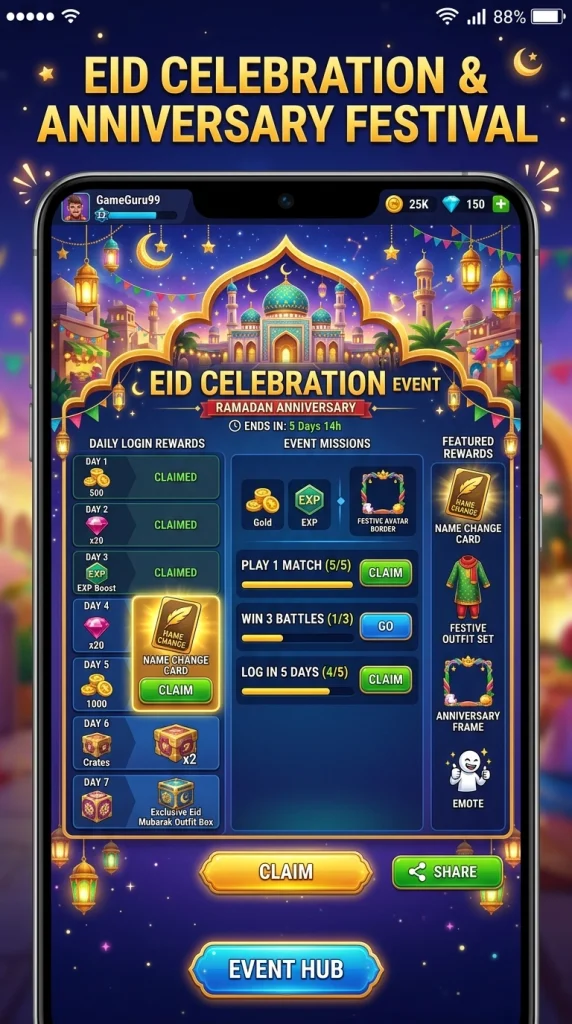
Login Reward Events: Some events give Name Change Cards as milestone login rewards (e.g., log in for 7 consecutive days and claim the card on day 5 or 7).
- Mission-Based Events: Complete a set number of matches, get a certain number of kills, or finish specific in-game tasks to unlock the card as a reward.
- Anniversary and Festival Events: During Free Fire’s major milestones such as anniversaries, Ramadan events, Eid specials, Diwali events, or New Year celebrations, Garena often gives away premium items including Name Change Cards.
- Spin and Lucky Draw Events: Some events feature a spin wheel or lucky draw where the Name Change Card is one of the prizes in the reward pool.
Important: Event availability varies by region and server. Always check the Events section on your Free Fire home screen to see what is currently active in your region.
Redeem a Free Fire Code for a Name Change Card
Garena periodically releases redemption codes during special promotions, tournaments, partner collaborations, and social media campaigns. Sometimes these codes include a Name Change Card as part of the reward bundle.
How to redeem a Free Fire code:
- Visit the official Free Fire redemption website: reward.ff.garena.com
- Log in using the same account you use to play Free Fire (Facebook, Google, VK, Apple ID, etc.).
- Enter the redemption code in the text box provided.
- Click ‘Confirm’ and wait for the reward to appear in your in-game mail.
- Open Free Fire, go to your in-game inbox, and collect the Name Change Card.
Where to find active codes: Follow Free Fire’s official Facebook page, Instagram, YouTube channel, and official Discord server. Codes are often announced during live streams and special events.
You can buy this card using diamonds from your Free Fire Advance Server rewards.
Use Guild Tokens for a Discount
If you are an active member of a Free Fire Guild, you can use Guild Tokens to get a discounted purchase on the Name Change Card. Guild Tokens are earned by participating in guild activities, completing guild missions, and playing regularly with your guild members.
- How to earn Guild Tokens: Play matches with your guild, complete weekly guild missions, and participate in guild wars.
- Where to spend Guild Tokens: Go to the Guild Store (inside the Guild section of the game) and look for the Name Change Card under available items.
- Discount amount: The discount varies but using Guild Tokens can significantly reduce the Diamond cost or replace it entirely depending on current guild store offerings.
Note: Guild Token pricing and availability may vary between servers and updates. Check your Guild Store regularly as the item rotation can change.
To match your new name, check our tips on how to get free skins in Free Fire.
Name Change Card vs Diamonds – Cost Comparison
Method | Cost | Best For |
Name Change Card (Store) | 390 Diamonds (one-time) | Easy and simple name change |
Direct Diamond Payment | 390 Diamonds each time | Quick change without a card |
Event Reward Card | Free (by completing missions) | Budget players who play events |
Redeem Code Card | Free (limited codes) | Players who follow Free Fire updates |
Guild Token Card | Guild Tokens (discounted) | Active guild members |
Tips for Choosing the Best Free Fire Name
Before you use your Name Change Card, it is worth taking a moment to choose a name you will genuinely be happy with long term. Here are practical tips:
Keep It Short and Memorable
The 12-character limit is there for a reason. Names that are 6 to 10 characters long tend to be the most impactful and readable in-game. Overly long names get cut off in chat and scoreboards.
Use Special Characters to Stand Out
Free Fire supports certain Unicode symbols and special characters that can give your name a visual flair. Characters like Greek letters, arrows, stars, and brackets can make your name look unique. However, do not overdo it readability is still important.
Match Your Playstyle
- Aggressive rusher? Try names that sound powerful, fierce, or intimidating.
- Sniper or strategist? Go for cool, calm, or clever-sounding names.
- Funny or casual player? A witty or humorous name can make the experience more enjoyable.
Avoid These Common Mistakes
- Don’t use your real name or personal details: Your in-game name is visible to everyone, so keep it private and safe.
- Avoid offensive or inappropriate words: These can be rejected, and you’ll lose your Name Change Card for nothing.
- Don’t copy popular player names: Create your own unique identity copying others looks unoriginal and can confuse players.
- Double-check spelling before confirming: Once you use the card, you can’t undo it. Always review your name carefully before finalizing.
Check Name Availability First
Free Fire does not allow two players to have the exact same name. Before choosing your new name, think of two or three alternatives in case your first choice is already taken by another player.
Whether you play on a phone or want to see if can you play Free Fire on PS4, your new name stays with your account.
How to Use a Name Change Card in Free Fire – Step by Step
Once you have your Name Change Card in your inventory, using it is simple. Follow these exact steps:
- Open Free Fire and go to the main lobby screen.
- Tap on your profile picture or avatar in the top-left corner of the screen.
- Your profile page will open. You will see your current nickname displayed at the top.
- Tap the pencil (edit) icon next to your current name.
- A dialog box will appear. If you have a Name Change Card in your inventory, you will see the option to ‘Use Name Change Card’ instead of being charged Diamonds.
- Type your new desired nickname in the input field (maximum 12 characters).
- Double-check your spelling before confirming once used, the card is consumed.
- Tap ‘Confirm’ or ‘OK’ to apply the change. Your new name will appear immediately.
Important: Name Change Cards are one-time use items. Once you confirm the new name, the card is consumed from your inventory regardless of whether you like the result. Always double-check your new name for typos before confirming.

Complete the Registration Form
Fill in all required details accurately:
- Your full name
- A valid and active email address make sure your inbox is not full, as the activation code will be sent here
- Your phone number (if required for your region)
- Your Free Fire Player ID
Double-check everything before submitting. Inaccurate information can disqualify your application.
Submit and Wait for Approval
Click the “Join Now” button to submit your registration. Your application will then show a “Pending” status.
Garena reviews all applications and selects a limited number of testers. This process is competitive not everyone gets selected. Codes are released in multiple waves, so if you do not see a code immediately, check back daily throughout the registration period.
Receive Your Activation Code
Just make sure you have a Free Fire Advance Server activation code to open the test app. If your account is selected, Garena will deliver your activation code in one of two ways:
- Displayed on your official dashboard on the Advance Server website
- Sent to your registered email address
When the download button on the official site turns green, it means you have been approved and the APK is ready for you.
Can You Gift a Name Change Card to Another Player?
Yes! Free Fire does allow players to gift a Name Change Card to friends. This is a popular gesture among squad members and friend groups, especially as a birthday gift or welcome present for new guild members.
How to Gift a Name Change Card in Free Fire
- Open the in-game Store and locate the Name Change Card.
- Instead of buying it for yourself, tap the “Gift” option on the item page.
- Choose your friend from your Free Fire friends list.
- Confirm the gift Diamonds will be deducted from your account, and the card will be sent directly to your friend’s in-game inbox.
Note: Both players must be added as friends in-game. Make sure your friend has accepted your friend request before sending the gift.
How to Change Your Name Without a Name Change Card (Diamond Method)
If you don’t have a Name Change Card but have enough Diamonds, you can still change your name in Garena Free Fire.
Steps to Change Name Using Diamonds:
- Open your profile in Free Fire
- Tap the pencil (edit) icon next to your name
- You will see an option to pay 390 Diamonds
- Enter your new name and tap confirm
- Your name will be changed instantly
Final Summary
Getting a Name Change Card in Free Fire is easy. You can buy it for 390 Diamonds in the store, or get it free through events, missions, redeem codes from Garena, or Guild Tokens in the Guild Store. Once you have it, just go to your profile, tap edit next to your name, select “Use Name Change Card,” enter your new name, and confirm. Your new name will update instantly.
Frequently Asked Questions
How Much Does a Name Change Card Cost in Free Fire?
A Name Change Card costs 390 Diamonds when purchased from the in-game store. Alternatively, you can get it for free through events, redemption codes, or at a discount using Guild Tokens.
Can I Get a Free Name Change Card in Free Fire?
Yes. Garena regularly offers Name Change Cards through limited-time events, login rewards, and redemption codes shared on official social media. Check the Events tab frequently.
How Many Times Can I Change My Name in Free Fire?
There’s no fixed limit. You can change your name as many times as you want, but each change requires either a Name Change Card or 390 Diamonds.
What Happens If My New Name Gets Rejected?
If your name is rejected (due to filters or availability), the Name Change Card is not used, so you can try again. Once accepted and confirmed, the card is consumed permanently.
Can I Change My Name Without Diamonds?
Yes. If you obtain a Name Change Card through events or redemption codes, you can change your name without spending Diamonds.
What happens if I don't receive a code?
You were not selected for this cycle. Do not worry you can register again for the next cycle (OB54, expected June 2026). Focus on keeping your account active and register as early as possible next time.
Can I use a VPN to register for the Advance Server?
You can use a VPN to access the registration page if it is not loading in your region. However, always disable your VPN before playing on the Advance Server, as regional mismatches cause login errors and can get your access revoked.
Does Changing My Name Affect My Rank or Stats?
No. Changing your name only updates your display nickname. Your rank, stats, friends list, guild, and progress remain unchanged.
Is There a Cooldown After Changing My Name?
There is no officially confirmed cooldown. In most cases, you can change your name anytime as long as you have a card or Diamonds, though some regions may have short limits.
Can I Use the Name Change Card on Free Fire MAX?
Yes. Both versions share the same account system, so your name will update across Free Fire and Free Fire MAX instantly.

